Hacking by Walkingice

2013/08/25

Configure shortcuts for Rhythmbox in Awesome WM

Well, I switched to use Awesome as my window manager several days ago. (goodbye gnome shell)

I used rhythmbox to play music, so this is my shortcuts.

awful.key( { "Shift", "Alt" }, "c", function ()
    awful.util.spawn("rhythmbox-client --no-start --play-pause", false) end),
awful.key( { "Shift", "Alt" }, "n", function ()
    awful.util.spawn("rhythmbox-client --no-start --next", false) end),
awful.key( { "Shift", "Alt" }, "p", function ()
    awful.util.spawn("rhythmbox-client --no-start --previous", false) end),
awful.key({ "Alt" }, "F12", function ()
    awful.util.spawn("rhythmbox-client --no-start --volume-up", false) end),
awful.key({ "Alt" }, "F11", function ()
    awful.util.spawn("rhythmbox-client --no-start --volume-down", false) end),

If you get the error message, do not forget to enable MPRIS D-bus Interface plug-in in Rythmbox settings.

(rhythmbox-client:15057): Rhythmbox-WARNING **: MPRIS D-Bus interface not available, some things won't work

2013/06/03

Trac cannot log in

Yesterday I upgrade my trac-accountmanager to 0.4.3 on my Debian laptop, then I cannot log in anymore.

The problem occurs due to configuration changing. Turn of debug log you will see

Trac[htfile] ERROR: acct_mgr: check_password() -- Can't locate password file ""

Just edit your trac.ini

from
htdigest_realm = your_realm
password_file = /path/to/htdigest
password_store = HtDigestStore

to
htdigest_realm =your_realm
htdigest_file = /path/to/htdigest
password_store = HtDigestStore

2013/05/29

Exclude dependency jar file from apk when using Ant for Android

To put it simply, Android ant packages each jar files under directory libs to the destination apk file, but I don't wanna it. This is just workaround. (I am using Android SDK Tools 22.0.1)

I am writing a simple Bluetooth 4.0 application which base on Samsung series mobile phone. Android is going to support Bluetooth 4.0 but it does not happen so far. That means I still need using Samsung BLE SDK to use Bluetooth 4.0, that's ok.

When I started learning Samsung BLE SDK via attached samples, it works well. It is build-able under Eclipse, it works. When I used Ant to build the apk (yes, I used to use command-line tool to do developing.), it failed.

I got a run-time error:  <A Class> had used a different <B class>; during pre-verification

W/dalvikvm(22070): Class resolved by unexpected DEX: Lcom/samsung/ble/pxpmonitor/ProximityService$3;(0x430e85d0):0x40086000 ref [Lcom/samsung/android/sdk/bt/gatt/BluetoothGattCallback;] Lcom/samsung/android/sdk/bt/gatt/BluetoothGattCallback;(0x430e85d0):0x40038000
W/dalvikvm(22070): (Lcom/samsung/ble/pxpmonitor/ProximityService$3; had used a different Lcom/samsung/android/sdk/bt/gatt/BluetoothGattCallback; during pre-verification)
W/dalvikvm(22070): Unable to resolve superclass of Lcom/samsung/ble/pxpmonitor/ProximityService$3; (60)
W/dalvikvm(22070): Link of class 'Lcom/samsung/ble/pxpmonitor/ProximityService$3;' failed
D/AndroidRuntime(22070): Shutting down VM
W/dalvikvm(22070): threadid=1: thread exiting with uncaught exception (group=0x41f83930)
E/AndroidRuntime(22070): FATAL EXCEPTION: main
E/AndroidRuntime(22070): java.lang.NoClassDefFoundError: com/samsung/ble/pxpmonitor/ProximityService$3
E/AndroidRuntime(22070):        at com.samsung.ble.pxpmonitor.ProximityService.(ProximityService.java:195)
E/AndroidRuntime(22070):        at java.lang.Class.newInstanceImpl(Native Method)
.....(skip)
E/AndroidRuntime(22070):        at java.lang.ClassLoader.loadClass(ClassLoader.java:461) 

Because the apk file I built contains ble_sdk.jar, and Samsung Galaxy S4 has the same (at least, the same name) implementation under /system/framework.

The problem is that I have to build some classes which depend on ble_sdk.jar, but I cannot package the ble_sdk.jar into apk file since it makes duplication.

In general, we put dependency libraries to directory libs, but the dex-helper macro in Android Ant build system merges EVERY JAR FILES INTO classes.dex. Cool, that bites me.


To put the ble_sdk.jar outside directory libs and asks ant-building-system refer to it? it doesn't work, we even cannot override the property jar.libs.dir. (issue #33194)

I tried to figure it out but quit with no luck. If you know a good way match my requirement, please tell me. This is my workaround. (workaround means --- Someday I will bite myself.)

Workaround: Do not package each jar under libs unless I ask you to do that.

Add a custom_rules.xml to your project with these statements.

<project>
<target name="-post-compile">
        <path id="project.all.jars.path">
                <!-- un-comment below line if you want it-->
                <!-- <pathelement path="libs/please_package_this.jar"> -->
        </path>
        <echo level="info">To be packaged jar: ${toString:project.all.jars.path}
</project>


It cleans project.all.jars.path that defines Android ant-building-system's merge targets. I don't like this idea but it basically works.

2012/08/15

change directory helper function

I wrote an article about it long time ago, now I write again to avoid lost my function.

If you are working in a big project such as Android, you will find that changing directory in a deep tree is painful.

Try adding this function to ~/.bashrc
..() {
    num=$1
    test $1 || num=1
    seq=`seq $num`
    next=`printf '../%.0s' {$seq}`
    cd $next
    ls
}

suppose you are at /home/foo/L1/L2/L3/L4

$ .. # will go to L3
$ .. 2 # will go to L2
$ .. 3 # will go to L1
$ .. 100 # will go to /

2012/06/11

Gnome-shell makes things tough

That is my murmur in google+.

Debian Testing is my distribution of choice, last night it upgrade gnome-shell from 3.2 to 3.4. The good thing it provides 'fixed workspace number' in settings. The bad things I loose all my 'shorcut key binding'. I have to reconfigure my working environment this morning to get things work, includes digging in extensions.gnome.org.

I do not use a computer for using computer itself, but I do use computer for finishing some works in my life.

However, each time I upgrade gnome-shell (metacity to gnome-shell 3.0, 3.0 to 3.2, 3.2 to 3.4). I have to spend lots of time to make my laptop becomes working.

Working means it acts like that I wish it was. That is too stupid, I get a new thing and spend time to make it old since the old one works better.

I use Linux since it provides more options to customize to fits me, otherwise I will use Mac OS X. I had a iBook G4, everytime when I was using it, I heard Steve Jobs is shouting "Fool, you are using your computer in wrong way". well, I think gnome-shell team is trying to teach me how to use computer as well.

Extensions website save my life. but it is wrong. extension should be 'improving' but not 'saving'. It is weird gnome-shell says 'do not complain, you have way to clean your room since I mess it up.'

I am a developer, I understand things must forward, I agree with 'making gnome forwarding'. But making a political decision is not only about right or wrong but about how.

If gnome-shell made everthing looks like before and pretend nothing changed when the first time people see gnome-shell. Trust me, everybody will love it. ("it make gnome forward slowly?" as I said, we are using computer to finish job, we are not using computer to use gnome-shell.)

One more thing, there is a executable called 'gnome-shell-extension-prefs' to modify preferences of extension, thats great. but you cannot find it by searching. you have to launch it via command line. AWESOME!

2012/04/09

Android Clickable Span in TextView

Note: You could find chinese version in my chinese blog.


Spannable brings lots of possibility to TextView, includes displaying various appearance of a Text and onClick callbak.

The normal way to make a TextView clickable is to use View.setOnClickListener. It sets a callback listener to the whole view. What if we just want to add callback to a substring of a text?


This pictures demonstrate

  • One TextView
  • The sub-string has variant color
  • The sub-string is clickable


Of course we could use ViewGroup + many TextView to accomplish that, spannable make things eaiser.(maybe....)

We can understand Span in this way: Put extra function to a CharSequence. For example, If I have string 'TheFinalAnswerIs42', I can set Red color to "Final" and make 42 clickable. But the TextView does not know so much things, it only focus on showing the whole string.


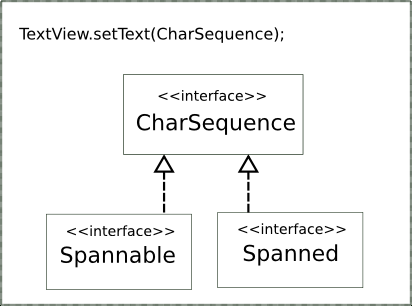
We know that TextView only needs CharSequence as its content, and both of Spannable and Spanned are sub-interface of CharSequence. The question becomes 'How to build desired CharSequence'

Android API Documentations tells us that we can use SpannableStringBuilder to generate SpannableString.

Spannable span = (new SpannableStringBuilder()).newSpannable("TheFinalAnswerIs42");
span.setSpan(new ForegroundColorSpan(0xFFFF0000), 3, 5,Spanned.SPAN_EXCLUSIVE_EXCLUSIVE);

So the string "Final" becomes red.And we are going to make '42' clickable.

span.setSpan(new MyClickableSpan(), 16, text.length(), Spanned.SPAN_EXCLUSIVE_EXCLUSIVE);
mTextView.setText(span);
mTextView.setMovementMethod(LinkMovementMethod.getInstance());


MyClickableSpan is to be a implementation of ClickableSpan. All we have to do is override method onClick.

Further question: why setSpan is using primitive class Object but not some interface such as Spanned?


API documentation also tells you that you can bind any your own object as Span to TextView. But how to use my customized span object? To solve this, we should understand how the TextView use ClickableSpan.

The source code of TextView tells us that it handle ClickableSpan in onTouchEvent.

In other words, to handle our customzied span object, we should extends TextView to use CustomizedTextView to accomplish it.

2011/09/14

tmux split window in current directory

I use tmux to instead of gnu-screen due to tmux supports vertical window splitting.

There are many common question such as 'How to create a new window in the current directory'. Here are some simple how-to, inspired by tmux FAQ.


1. Preparing - set environment variable by PS1 in shell
add this line to your .bashrc
PS1='$([ -n "$TMUX" ] && tmux setenv TMUXPWD_$(tmux display -p "#I") $PWD)${debian_chroot:+($debian_chroot)}\u@\h:\w\$ '


How it works?


$([ -n "$TMUX" ] && tmux setenv TMUXPWD_$(tmux display -p "#I") $PWD)
The previous half part makes the magic, #I indicates the index of each displays. In display 1, it saves current directory ($PWD) into environment variable $TMUXPWD_1, corresponding to $TMUXPWD_2, $TMUXPWD_3 ...etc.

Just type 'printenv |grep TMUXPWD' and you will know everything.


${debian_chroot:+($debian_chroot)}\u@\h:\w\$
Well, this is my own prompt (such as walkingice@my_laptop$ ), you can keep your own settings by 'cat ~/.bashrc |grep PS1'


2. Create new window in current directory
Follow the common FAQ, add this line to your .tmux.conf
bind-key c run-shell 'tmux neww "cd $(tmux display -p "\$TMUXPWD_#I"); exec bash"'
3. Split window in current directory
Since we did the magic to PS1, why don't we keep using it? Add these two lines to your .tmux.conf
bind-key h run-shell 'tmux splitw -v "cd $(tmux display -p "\$TMUXPWD_#I"); exec bash"'
bind-key v run-shell 'tmux splitw -h "cd $(tmux display -p "\$TMUXPWD_#I"); exec bash"'
Caution: I prefer Ctrl-a h to split horizontal window(splitw -v). In other words, when I click Ctrl-a h, I am saying "Hey, give me a horizontal line". I think it make more sense than tmux original key binding.

2011/06/03

To change default window manager

This is a quick note for myself to avoid bother [Kanru] again and again.

Why

I use compiz in my Debian a lot. The default window manager in Gnome2 is metacity. I would not like to type this command once I reboot.
$ compiz ccp --indirect-rendering --replace

How

Tell gnome to use compiz as default windowmanager
  • open gconf-editor, navigate to /desktop/gnome/session/required_components
  • change value of windowmanager to compiz
  • logout and login, here you go
If you want to specify some runtime parameters to compiz like me ( assign ccp --indirect-rendering), just to
  • edit /usr/share/applications/compiz.desktop
  • change the value of Exec to Exec=compiz ccp --indirect-rendering

I have tried edit ~/.gnomerc but it does not work.

    2010/10/06

    Ubuntu wifi connection randomly disconnect

    I am using Ubuntu Linux 10.04 but had this annoying problem since Ubuntu 9.04. When I am at some place and use particular Access Point, the Wifi connection on my laptop randomly disconnect. Although I reboot laptop, reconnect to wifi, it still disconnect in less than one minute.

    Image that, you open browser and enter gmail, click first unread mail then you lose connection. That repeat 100 times in one hour. Gosh !

    Jserv told me the Wifi driver mode N is not so stable as my imagination. Follow his suggestion I turned off the N mode and it does not annoy me anymore. (at least now)

    Here is the workaround
    # unload iwlagn
    $ sudo rmmod iwlagn
    # load again with disable options
    $ sudo modprobe iwlagn 11n_disable50=1 11n_disable=1


    If it works, you can add it to /etc/modprobe.d. Once system modprobe this module, these options will be used.
    $ echo "options iwlagn 11n_disable50=1 11n_disable=1" > /etc/modprobe.d/iwlagn.conf
    

    There is another problem. If I suspend my laptop and put it into my backpack. Sometimes the hardware wifi switch will be turned off. If I resume the laptop while the wifi switch turned off, I can not turn it on anymore.

    You can try this command, it works for me.
    $ sudo rfkill block all
    $ sudo rfkill unblock all
    

    2010/09/04

    NotifyOSD Dispute

    You might googled this article with the same reason I had. Days ago I updated my Ubuntu9.04 to Ubuntu10.04 and really enjoy it. There are sort of things annoy me - the notification at the corner displays TOO LONG.

    To put the question simply: You  cannot change the displaying period of notification.

    I use Rhythmbox to listen music, the new version of Rhythmbox at Ubuntu10.04 is sweet because it displays a notification once it finish playing a song and starting next one. This feature is very like Amarok just did, I like it excepts the displaying period is too long.

    Most of guys like to coding and listening music at the same time. When the notification coming, you say "Ok, I got it" and back to your original work. 10 seconds passed then the notification disappears, and grab your attention AGAIN : "Hey, I am leaving, bye bye"

    Gosh!

    It is very like SMS and Phone Call. When you get a SMS message, your mobile just beep for one second. But phone calling keeps shouting until 30 seconds pass or pick up your phone.

    Oh, you cannot even close the notification by clicking it.

    According to my experience of using Amarok, a user can tweak the period to fit his own requirement. But I cannot find any option in Rhythmbox. I guess the main developers of Rhythmbox are too busy to do that, send a patch to them might be a good idea.

    Building Rhythmbox is pretty easy, just checkout the source code then type
    ./autogen.sh --enable-libnotify --prefix=/tmp/mybuild # I want to install to /tmp/mybuild
    make
    make install
    
    Actually, the notification mechanism was implemented by plug-in. See rhythmbox/plugins/status-icon/rb-status-icon-plugin.c
    static void do_notify (RBStatusIconPlugin *plugin,
               guint timeout,
               const char *primary,
               const char *secondary,
               GdkPixbuf *pixbuf,
               gboolean show_action) 
    {
            .....
            notify_notification_set_timeout (plugin->priv->notification, timeout);
            ....... 
    }


    The function makes the notification and it also set timeout. But, whatever I did to the variables timeout, the notification always displays 10 seconds.

    I doubt there is a bug at libnotify so I checkout the source. the function notify_notification_show at libnotify/notification.c did send an notification with expect timeout to dbus. The command notify-send did as well. Actually, even if you write a small script to send notification request with expect timeout to dbus, you still got 10 seconds notification.
        #!/usr/bin/env python 
        import dbus
        item = ('org.freedesktop.Notifications')
        path = ('/org/freedesktop/Notifications')
        interface = ('org.freedesktop.Notifications')
        time = 2000 # 2second
        bus = dbus.SessionBus()
        notif = bus.get_object(item, path)
        notify = dbus.Interface(notif, interface)
        notify.Notify('blah', 0, '', 'Ouch', '2 seconds,please', '', '', time) 


    Rhythmbox is ok, libnotify is ok. What thing is go wrong? Take a look of the source code of NotifyOSD. See notify-osd-0.9.29/src/default.c

        /* these values are interpreted as milliseconds-measurements and do comply to  * the visual guide for jaunty-notifications */ 
        #define DEFAULT_FADE_IN_TIMEOUT      250 
        #define DEFAULT_FADE_OUT_TIMEOUT     1000 
        #define DEFAULT_ON_SCREEN_TIMEOUT    10000 
    
        ...... 
                property_on_screen_timeout = g_param_spec_int (
                                        "on-screen-timeout",
                                        "on-screen-timeout",
                                        "Timeout for bubble on screen in milliseconds",
                                        0,
                                        10000,
                                        DEFAULT_ON_SCREEN_TIMEOUT,
                                        G_PARAM_CONSTRUCT |
                                        G_PARAM_READWRITE |
                                        G_PARAM_STATIC_STRINGS);
                g_object_class_install_property (gobject_class,
                                                 PROP_ON_SCREEN_TIMEOUT,
                                                 property_on_screen_timeout);


    And then see function stack_notify_handler at stack.c
        if (bubble_get_id (bubble) == FORCED_SHUTDOWN_THRESHOLD)
                g_timeout_add (defaults_get_on_screen_timeout (self->defaults),
                               _arm_forced_quit,
                               (gpointer) self);


    As you see, NotifyOSD defines a default on-screen-time to 10 seconds and use it at handling notification. But Why? take a look of this [design specification for Notify OSD]. It said "All other hints, and all other parameters (including expire_timeout) should be ignored."

    Well, there is a huge discussion at [Launchpad Bug Tracker (#390508)]. I read the whole thread. Ouch, thats pretty tough for me, a non-native English speaker. (But I still did, now you know how much I care about this issue.) Matthew Paul Thomas [said]

          the timeout parameter is for application developers, not end users. We think we can set more consistent and reliable durations for users automatically than diverse application developers ever could manually.

    That really pissed off many developers :-P.

    First, why 10 seconds? Why not 9.5 second, 10.5 second or 3.14159265358 seconds? Does they really did a research and find THE BEST NUMBER?(I do believe it should be 42) We don't know, we just got the answer: 10.

    Ok, 10 is fine. Displays a notification in 10 seconds by default is fine. But why can't an end user change 10 seconds to another number? Is that a bad idea? That is not for developer, that is for end user.

    Those developers went to there and complained because they really care about what they are using. Many end users don't complain because they don't know how to complain but not they think the design is good. Every developer who ever designed a UI agrees that making a good interface is so hard therefore making mistake is just so easy.
    Providing a good default settings and a option to customize is always a better way.

    Unfortunately, Ubuntu has its right to set period to any seconds it want because that is Open Source. I agree but disappointed. John Lee mentioned [How to use notification-daemon to instead of notify osd], I will replace it and say bye bye to NotifyOSD. Moreover, you can use [patched NotifyOSD]

    2010/06/10

    MotionEvent on HTC Hero

    I have both of HTC Hero and Nexus One. Thanks God and HTC, finally Hero users got the Android Eclair update via OTA.

    Recently I found a weird behavior on HTC Hero and differs from my Nexus One.

    Here is the testing code

    public boolean onTouchEvent(MotionEvent event) {
    long now = android.os.SystemClock.uptimeMillis();
    android.util.Log.i("Ouch", "keep pressing:" + (now - event.getDownTime()));
    return false;
    }

    I just keep pressing the screen and see the log output which tells the pressing time in millisecond.

    Nexus One (Eclair)
    (just press and do not drag)
    I/Ouch (11979): keep pressing:2
    I/Ouch (11979): keep pressing:14
    I/Ouch (11979): keep pressing:43
    I/Ouch (11979): keep pressing:71
    I/Ouch (11979): keep pressing:98
    I/Ouch (11979): keep pressing:127
    I/Ouch (11979): keep pressing:154
    I/Ouch (11979): keep pressing:189
    I/Ouch (11979): keep pressing:214
    I/Ouch (11979): keep pressing:238
    I/Ouch (11979): keep pressing:265
    I/Ouch (11979): keep pressing:294
    I/Ouch (11979): keep pressing:324
    I/Ouch (11979): keep pressing:351
    I/Ouch (11979): keep pressing:380
    I/Ouch (11979): keep pressing:405
    I got 16 events in 0.4 seconds, that is well known event "Touch Event Flood".

    HTC Hero (Eclair)
    (just press, I do not drag)
    W/Rosie ( 152): mAddHtcWidgetByOtherActivity = false, mIsOpenSlideWhenLeaveLaunch = true
    I/Ouch ( 2149): keep pressing:4
    I/Ouch ( 2149): keep pressing:17
    I/Ouch ( 2149): keep pressing:26
    I/Ouch ( 2149): keep pressing:62
    I/Ouch ( 2149): keep pressing:245
    I/Ouch ( 2149): keep pressing:421
    I/Ouch ( 2149): keep pressing:817
    I/Ouch ( 2149): keep pressing:1671
    D/dalvikvm( 528): GC freed 1174 objects / 73000 bytes in 139ms
    (8 seconds left, I start moving my finger)
    I/Ouch ( 2149): keep pressing:8372
    I/Ouch ( 2149): keep pressing:8697
    I/Ouch ( 2149): keep pressing:8743
    I/Ouch ( 2149): keep pressing:8752
    D/dalvikvm( 135): GC freed 211 objects / 10464 bytes in 241ms

    In the first 1.6 seconds, I got 8 events. I still kept pressing the screen untle 8 seconds left. I started dragging and then got touch event as I expects.

    I guess Sense-UI of HTC Hero did some change to deal with touch event flood. It should be good thing but I guess that kicks someone's ass.

    2010/03/30

    Javadoc at Android

    * This article also post to 0xlab planet *
    I have a tiny, useless brain with slow frequency, 128 bytes L1 cache and 256K Ram. Therefore, I cannot remember everything while I am doing Java programming.

    Although you are not a nut like me, you might still need Java API documentation. Well, we could read the [online version], thats cool.

    But what if you are a poor guy cannot pay for network. You still have to work on the Bus, at Starbucks coffee, at toilet or on the bed.

    Luckily, you could generate offline documentation by command

    $make docs

    But I do not like droiddoc. I cannot explain why I dislike it.

    I like the original javadoc style, it is like although I had PS but I still love FF3 on FC. (bad example I know)

    I read article of [androidjavadoc] and prepared this [patch], you could generate your own old style offline java documentation.

    From bfe51b44ee6f6c1a989d34c96f9b0ea457731d80 Mon Sep 17 00:00:00 2001
    From: Julian Chu

    Date: Wed, 26 Aug 2009 12:19:36 +0800
    Subject: [PATCH] Create original javadoc

    Apply this patch and type in
    $make docs
    ---
    core/droiddoc.mk | 12 ++++--------
    1 files changed, 4 insertions(+), 8 deletions(-)

    diff --git a/core/droiddoc.mk b/core/droiddoc.mk
    index 30bd918..af4121e 100644
    --- a/core/droiddoc.mk
    +++ b/core/droiddoc.mk
    @@ -159,17 +159,13 @@ $(full_target): $(full_src_files) $(droiddoc_templates) $(droiddoc) $(html_dir_f
    -J-Xmx768m \
    -J-Djava.library.path=$(HOST_OUT_SHARED_LIBRARIES) \
    $(PRIVATE_PROFILING_OPTIONS) \
    - -quiet \
    - -doclet DroidDoc \
    - -docletpath $(PRIVATE_DOCLETPATH) \
    - -templatedir $(PRIVATE_CUSTOM_TEMPLATE_DIR) \
    - -templatedir $(PRIVATE_TEMPLATE_DIR) \
    - $(PRIVATE_DROIDDOC_HTML_DIR) \
    + -overview $(TOP)/frameworks/base/core/java/overview.html \
    + -splitindex \
    + -use \
    + -package \
    $(addprefix -classpath ,$(PRIVATE_CLASSPATH)) \
    -sourcepath $(PRIVATE_SOURCE_PATH)$(addprefix :,$(PRIVATE_CLASSPATH)) \
    -d $(PRIVATE_OUT_DIR) \
    - $(PRIVATE_CURRENT_BUILD) $(PRIVATE_CURRENT_TIME) \
    - $(PRIVATE_DROIDDOC_OPTIONS) \
    && rm -rf $(PRIVATE_OUT_ASSET_DIR) \
    && rm -rf $(PRIVATE_OUT_CUSTOM_ASSET_DIR) \
    && mkdir -p $(PRIVATE_OUT_ASSET_DIR) \
    --
    1.6.3.3
    The generating documentation will be put under out/common/host/….Once you finish it, you could revert the previous patch and pretend nothing happened
    $ cd /WHERE/TO/ANDROID/build/
    $ git reset –-hard HEAD^
    ps. I tried it on Eclair, it works.


    Update: you can tweak the stylesheet.css to make it looks better
    -body { background-color: #FFFFFF; color:#000000 }
    +body { background-color: #FFFFFF; color:#000000; margin : auto; max-width: 1024px; margin-top: 30px;}

    2008/11/30

    Starting at EFL

    Well, I want to write something about EFL first.

    [EFL], Enlightenment Foundation Libraries, is a GUI libraries which let you draw something on X. The windows manager Enlightenment is written by EFL. The position of EFL in Enlightenment is like GTK for Gnome or Qtopia for KDE.

    The maintainer make huge progress in EFL therefore it changes very fast.
    Before he make a release of EFL, we can say that EFL changes EVERYDAY.

    Rasterman, one maintainer of EFL, provided a script (get_e.sh) that you may build EFL easily.

    However, for the reason that getting more stable, Openmoko only use svn revision 36882 of EFL before it release.

    You can use this script to checkout out the source code and build it with revision 36882.

    #!/bin/bash

    sudo echo "Get Root permission" || exit
    list="eina eet evas ecore e_dbus efreet embryo edje etk edje_editor edje_viewer"

    for l in $list;do
    svn co -r 36882 http://svn.enlightenment.org/svn/e/trunk/$l
    cd $l
    ./autogen.sh || exit
    make
    sudo make install
    cd ..
    done

    Hello Blogger

    Hi, this is the first article in this blog. I am Julian Chu, a Chinese native speaker and live in Taiwan.

    I am going to use this blog to write some boring and sleepy technical stuffs. Recordes what I learned and hopes it could help me to improve my poor English.