Hacking by Walkingice

2013/05/29

Exclude dependency jar file from apk when using Ant for Android

To put it simply, Android ant packages each jar files under directory libs to the destination apk file, but I don't wanna it. This is just workaround. (I am using Android SDK Tools 22.0.1)

I am writing a simple Bluetooth 4.0 application which base on Samsung series mobile phone. Android is going to support Bluetooth 4.0 but it does not happen so far. That means I still need using Samsung BLE SDK to use Bluetooth 4.0, that's ok.

When I started learning Samsung BLE SDK via attached samples, it works well. It is build-able under Eclipse, it works. When I used Ant to build the apk (yes, I used to use command-line tool to do developing.), it failed.

I got a run-time error:  <A Class> had used a different <B class>; during pre-verification

W/dalvikvm(22070): Class resolved by unexpected DEX: Lcom/samsung/ble/pxpmonitor/ProximityService$3;(0x430e85d0):0x40086000 ref [Lcom/samsung/android/sdk/bt/gatt/BluetoothGattCallback;] Lcom/samsung/android/sdk/bt/gatt/BluetoothGattCallback;(0x430e85d0):0x40038000
W/dalvikvm(22070): (Lcom/samsung/ble/pxpmonitor/ProximityService$3; had used a different Lcom/samsung/android/sdk/bt/gatt/BluetoothGattCallback; during pre-verification)
W/dalvikvm(22070): Unable to resolve superclass of Lcom/samsung/ble/pxpmonitor/ProximityService$3; (60)
W/dalvikvm(22070): Link of class 'Lcom/samsung/ble/pxpmonitor/ProximityService$3;' failed
D/AndroidRuntime(22070): Shutting down VM
W/dalvikvm(22070): threadid=1: thread exiting with uncaught exception (group=0x41f83930)
E/AndroidRuntime(22070): FATAL EXCEPTION: main
E/AndroidRuntime(22070): java.lang.NoClassDefFoundError: com/samsung/ble/pxpmonitor/ProximityService$3
E/AndroidRuntime(22070):        at com.samsung.ble.pxpmonitor.ProximityService.(ProximityService.java:195)
E/AndroidRuntime(22070):        at java.lang.Class.newInstanceImpl(Native Method)
.....(skip)
E/AndroidRuntime(22070):        at java.lang.ClassLoader.loadClass(ClassLoader.java:461) 

Because the apk file I built contains ble_sdk.jar, and Samsung Galaxy S4 has the same (at least, the same name) implementation under /system/framework.

The problem is that I have to build some classes which depend on ble_sdk.jar, but I cannot package the ble_sdk.jar into apk file since it makes duplication.

In general, we put dependency libraries to directory libs, but the dex-helper macro in Android Ant build system merges EVERY JAR FILES INTO classes.dex. Cool, that bites me.


To put the ble_sdk.jar outside directory libs and asks ant-building-system refer to it? it doesn't work, we even cannot override the property jar.libs.dir. (issue #33194)

I tried to figure it out but quit with no luck. If you know a good way match my requirement, please tell me. This is my workaround. (workaround means --- Someday I will bite myself.)

Workaround: Do not package each jar under libs unless I ask you to do that.

Add a custom_rules.xml to your project with these statements.

<project>
<target name="-post-compile">
        <path id="project.all.jars.path">
                <!-- un-comment below line if you want it-->
                <!-- <pathelement path="libs/please_package_this.jar"> -->
        </path>
        <echo level="info">To be packaged jar: ${toString:project.all.jars.path}
</project>


It cleans project.all.jars.path that defines Android ant-building-system's merge targets. I don't like this idea but it basically works.

2012/08/15

change directory helper function

I wrote an article about it long time ago, now I write again to avoid lost my function.

If you are working in a big project such as Android, you will find that changing directory in a deep tree is painful.

Try adding this function to ~/.bashrc
..() {
    num=$1
    test $1 || num=1
    seq=`seq $num`
    next=`printf '../%.0s' {$seq}`
    cd $next
    ls
}

suppose you are at /home/foo/L1/L2/L3/L4

$ .. # will go to L3
$ .. 2 # will go to L2
$ .. 3 # will go to L1
$ .. 100 # will go to /

2012/06/11

Gnome-shell makes things tough

That is my murmur in google+.

Debian Testing is my distribution of choice, last night it upgrade gnome-shell from 3.2 to 3.4. The good thing it provides 'fixed workspace number' in settings. The bad things I loose all my 'shorcut key binding'. I have to reconfigure my working environment this morning to get things work, includes digging in extensions.gnome.org.

I do not use a computer for using computer itself, but I do use computer for finishing some works in my life.

However, each time I upgrade gnome-shell (metacity to gnome-shell 3.0, 3.0 to 3.2, 3.2 to 3.4). I have to spend lots of time to make my laptop becomes working.

Working means it acts like that I wish it was. That is too stupid, I get a new thing and spend time to make it old since the old one works better.

I use Linux since it provides more options to customize to fits me, otherwise I will use Mac OS X. I had a iBook G4, everytime when I was using it, I heard Steve Jobs is shouting "Fool, you are using your computer in wrong way". well, I think gnome-shell team is trying to teach me how to use computer as well.

Extensions website save my life. but it is wrong. extension should be 'improving' but not 'saving'. It is weird gnome-shell says 'do not complain, you have way to clean your room since I mess it up.'

I am a developer, I understand things must forward, I agree with 'making gnome forwarding'. But making a political decision is not only about right or wrong but about how.

If gnome-shell made everthing looks like before and pretend nothing changed when the first time people see gnome-shell. Trust me, everybody will love it. ("it make gnome forward slowly?" as I said, we are using computer to finish job, we are not using computer to use gnome-shell.)

One more thing, there is a executable called 'gnome-shell-extension-prefs' to modify preferences of extension, thats great. but you cannot find it by searching. you have to launch it via command line. AWESOME!

2012/04/09

Android Clickable Span in TextView

Note: You could find chinese version in my chinese blog.


Spannable brings lots of possibility to TextView, includes displaying various appearance of a Text and onClick callbak.

The normal way to make a TextView clickable is to use View.setOnClickListener. It sets a callback listener to the whole view. What if we just want to add callback to a substring of a text?


This pictures demonstrate

  • One TextView
  • The sub-string has variant color
  • The sub-string is clickable


Of course we could use ViewGroup + many TextView to accomplish that, spannable make things eaiser.(maybe....)

We can understand Span in this way: Put extra function to a CharSequence. For example, If I have string 'TheFinalAnswerIs42', I can set Red color to "Final" and make 42 clickable. But the TextView does not know so much things, it only focus on showing the whole string.


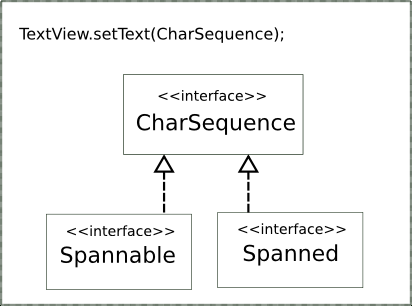
We know that TextView only needs CharSequence as its content, and both of Spannable and Spanned are sub-interface of CharSequence. The question becomes 'How to build desired CharSequence'

Android API Documentations tells us that we can use SpannableStringBuilder to generate SpannableString.

Spannable span = (new SpannableStringBuilder()).newSpannable("TheFinalAnswerIs42");
span.setSpan(new ForegroundColorSpan(0xFFFF0000), 3, 5,Spanned.SPAN_EXCLUSIVE_EXCLUSIVE);

So the string "Final" becomes red.And we are going to make '42' clickable.

span.setSpan(new MyClickableSpan(), 16, text.length(), Spanned.SPAN_EXCLUSIVE_EXCLUSIVE);
mTextView.setText(span);
mTextView.setMovementMethod(LinkMovementMethod.getInstance());


MyClickableSpan is to be a implementation of ClickableSpan. All we have to do is override method onClick.

Further question: why setSpan is using primitive class Object but not some interface such as Spanned?


API documentation also tells you that you can bind any your own object as Span to TextView. But how to use my customized span object? To solve this, we should understand how the TextView use ClickableSpan.

The source code of TextView tells us that it handle ClickableSpan in onTouchEvent.

In other words, to handle our customzied span object, we should extends TextView to use CustomizedTextView to accomplish it.

2011/09/14

tmux split window in current directory

I use tmux to instead of gnu-screen due to tmux supports vertical window splitting.

There are many common question such as 'How to create a new window in the current directory'. Here are some simple how-to, inspired by tmux FAQ.


1. Preparing - set environment variable by PS1 in shell
add this line to your .bashrc
PS1='$([ -n "$TMUX" ] && tmux setenv TMUXPWD_$(tmux display -p "#I") $PWD)${debian_chroot:+($debian_chroot)}\u@\h:\w\$ '


How it works?


$([ -n "$TMUX" ] && tmux setenv TMUXPWD_$(tmux display -p "#I") $PWD)
The previous half part makes the magic, #I indicates the index of each displays. In display 1, it saves current directory ($PWD) into environment variable $TMUXPWD_1, corresponding to $TMUXPWD_2, $TMUXPWD_3 ...etc.

Just type 'printenv |grep TMUXPWD' and you will know everything.


${debian_chroot:+($debian_chroot)}\u@\h:\w\$
Well, this is my own prompt (such as walkingice@my_laptop$ ), you can keep your own settings by 'cat ~/.bashrc |grep PS1'


2. Create new window in current directory
Follow the common FAQ, add this line to your .tmux.conf
bind-key c run-shell 'tmux neww "cd $(tmux display -p "\$TMUXPWD_#I"); exec bash"'
3. Split window in current directory
Since we did the magic to PS1, why don't we keep using it? Add these two lines to your .tmux.conf
bind-key h run-shell 'tmux splitw -v "cd $(tmux display -p "\$TMUXPWD_#I"); exec bash"'
bind-key v run-shell 'tmux splitw -h "cd $(tmux display -p "\$TMUXPWD_#I"); exec bash"'
Caution: I prefer Ctrl-a h to split horizontal window(splitw -v). In other words, when I click Ctrl-a h, I am saying "Hey, give me a horizontal line". I think it make more sense than tmux original key binding.

2011/06/03

To change default window manager

This is a quick note for myself to avoid bother [Kanru] again and again.

Why

I use compiz in my Debian a lot. The default window manager in Gnome2 is metacity. I would not like to type this command once I reboot.
$ compiz ccp --indirect-rendering --replace

How

Tell gnome to use compiz as default windowmanager
  • open gconf-editor, navigate to /desktop/gnome/session/required_components
  • change value of windowmanager to compiz
  • logout and login, here you go
If you want to specify some runtime parameters to compiz like me ( assign ccp --indirect-rendering), just to
  • edit /usr/share/applications/compiz.desktop
  • change the value of Exec to Exec=compiz ccp --indirect-rendering

I have tried edit ~/.gnomerc but it does not work.

    2010/10/06

    Ubuntu wifi connection randomly disconnect

    I am using Ubuntu Linux 10.04 but had this annoying problem since Ubuntu 9.04. When I am at some place and use particular Access Point, the Wifi connection on my laptop randomly disconnect. Although I reboot laptop, reconnect to wifi, it still disconnect in less than one minute.

    Image that, you open browser and enter gmail, click first unread mail then you lose connection. That repeat 100 times in one hour. Gosh !

    Jserv told me the Wifi driver mode N is not so stable as my imagination. Follow his suggestion I turned off the N mode and it does not annoy me anymore. (at least now)

    Here is the workaround
    # unload iwlagn
    $ sudo rmmod iwlagn
    # load again with disable options
    $ sudo modprobe iwlagn 11n_disable50=1 11n_disable=1


    If it works, you can add it to /etc/modprobe.d. Once system modprobe this module, these options will be used.
    $ echo "options iwlagn 11n_disable50=1 11n_disable=1" > /etc/modprobe.d/iwlagn.conf
    

    There is another problem. If I suspend my laptop and put it into my backpack. Sometimes the hardware wifi switch will be turned off. If I resume the laptop while the wifi switch turned off, I can not turn it on anymore.

    You can try this command, it works for me.
    $ sudo rfkill block all
    $ sudo rfkill unblock all